RESTful APIs
LECTURE SLIDE DECK
Intro
You've already built two important pieces of a real application: a React + Vite frontend that users can see and interact with, and a PostgreSQL database in Supabase that stores your data. But right now, those two pieces can't talk to each other. There's a gap between them — and that gap is where APIs live.
By the end of this lecture, you'll understand what a RESTful API is, why it exists, and how to use one. You'll interact directly with real API endpoints that Supabase has already generated for your users and tasks tables — no code required yet. The goal is to build a mental model for how data moves between a UI and a database before you start writing application logic.
Lesson
What is a RESTful API?
An API (Application Programming Interface) is a defined way for two pieces of software to communicate. When developers say "API" in the context of web development, they almost always mean a web API — a system that accepts HTTP requests and returns data (usually JSON).
REST stands for Representational State Transfer. It's not a technology or a library — it's a set of architectural conventions for designing web APIs. An API that follows these conventions is called a RESTful API.
The key conventions you need to know right now are:
- Resources are identified by URLs (e.g.,
/users,/tasks,/pokemon,/students,/books) and are usually pluralized nouns - You interact with those resources using standard HTTP methods (GET, POST, PUT, PATCH, DELETE)
- Data is typically exchanged in JSON format (i.e. an JavaScript object or a Python dictionary)
- Each request is stateless — the server doesn't remember anything about previous requests; every request must contain all the information needed to process it
What Does a RESTful API Do?
A RESTful API acts as a contract and a gatekeeper between your UI and your database. Neither the frontend nor the database talks directly to the other — the API sits in between.
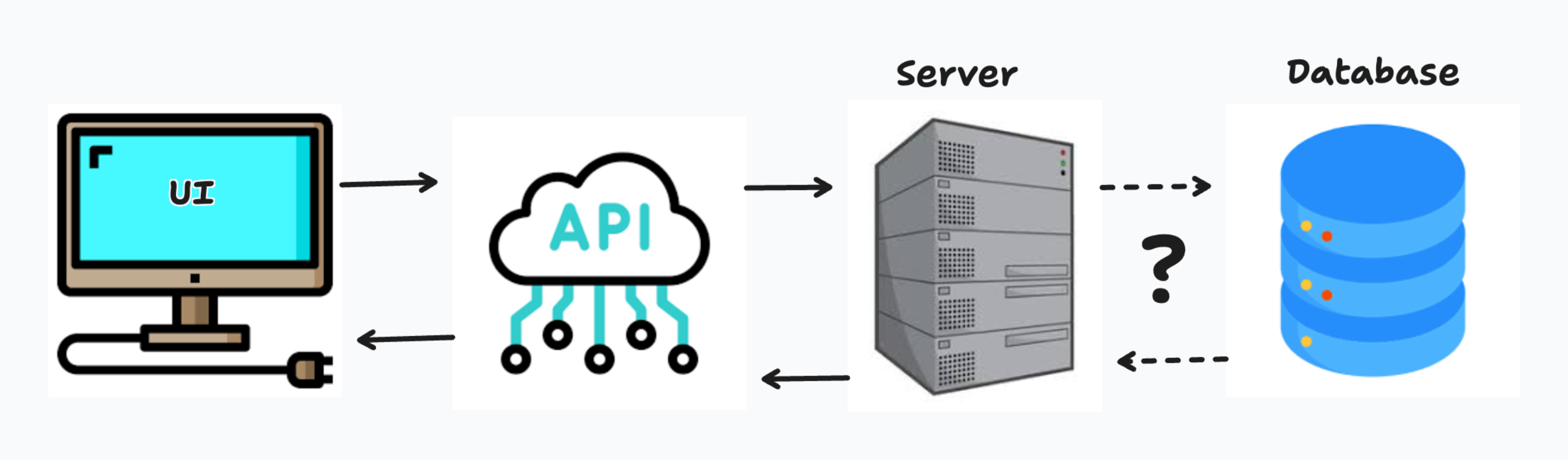
This separation exists for good reasons:
- Security — The API can verify that a user is allowed to do what they're asking before touching the database
- Consistency — Any client (your React app, a mobile app, a third-party integration) uses the same API, getting the same data in the same format
- Control — You decide exactly what data is exposed and how it can be modified; the raw database is never directly accessible to the outside world
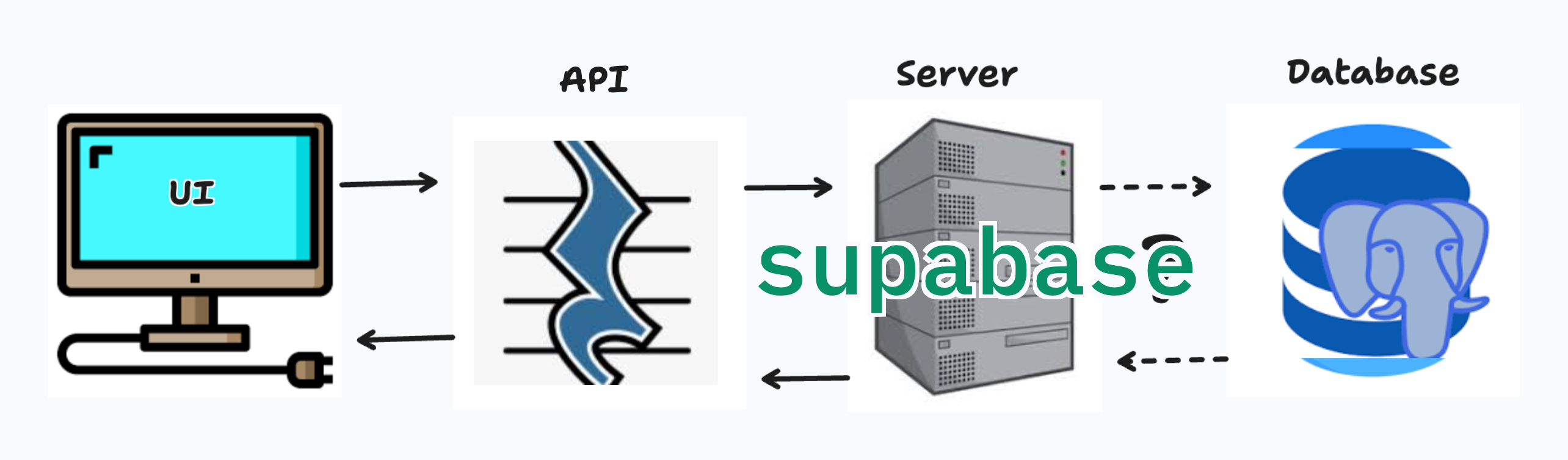
In Supabase's case, they've built a RESTful API layer called PostgREST that automatically generates endpoints for every table in your database. You don't have to write the API yourself — it's already there. But understanding what it's doing is essential before you start building your own logic on top of it.
What is CRUD?
Almost every interaction with a database falls into one of four categories. The industry uses the acronym CRUD to describe them:
| Letter | Operation | HTTP Method | SQL Equivalent |
|---|---|---|---|
| C | Create | POST | INSERT |
| R | Read | GET | SELECT |
| U | Update | PATCH / PUT | UPDATE |
| D | Delete | DELETE | DELETE |
These four operations map directly to the HTTP methods you'll use when making requests to a RESTful API. Let's look at each one.
Create — POST — Requires a Payload
A POST request is used to create a new resource. When you create a new user or add a new task, you're sending a POST request.
POST requests require a payload — a body of data attached to the request that tells the server what to create. This payload is almost always formatted as JSON.
Example: Creating a new task
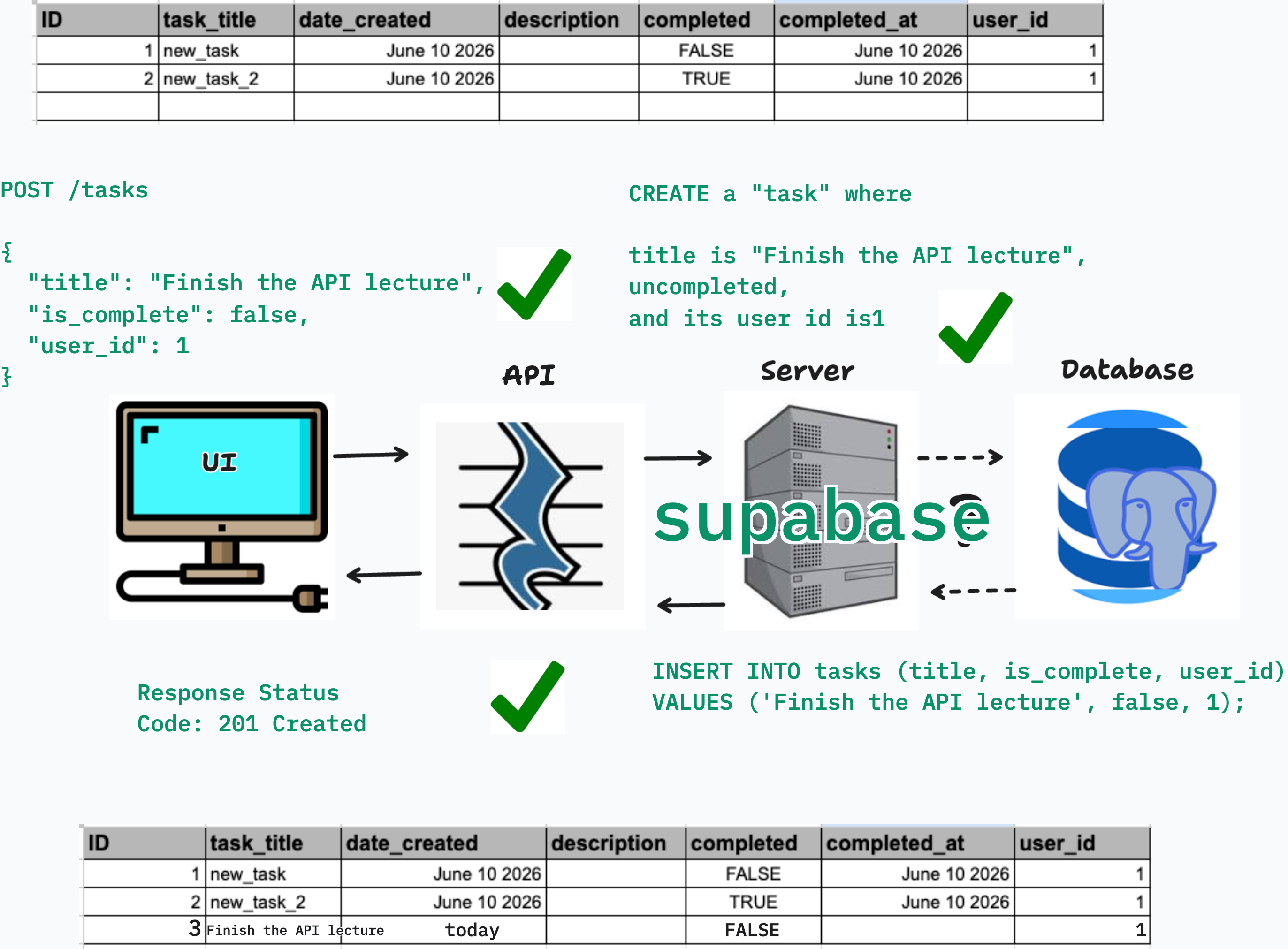
POST /tasks
Content-Type: application/json

{
  "title": "Finish the API lecture",
  "is_complete": false,
  "user_id": 1
}
The server receives this, validates it, and inserts a new row into the tasks table. It typically responds with the newly created record (including its generated id) and a 201 Created status code.
What happens without a payload? The server has nothing to insert. You'll get an error — usually a 400 Bad Request.
Read — GET
A GET request is used to retrieve data. It does not modify anything on the server. GET requests have no body — all information is passed through the URL.
Fetch all tasks:
GET /tasks
Fetch a specific task by ID:
GET /tasks?id=eq.3
Fetch only incomplete tasks:
GET /tasks?is_complete=eq.false
Supabase's PostgREST API uses a query parameter syntax to let you filter, sort, and limit results directly through the URL — no custom code needed.
A successful GET request returns a 200 OK status along with the matching data as a JSON array.
Update — PATCH / PUT — Requires a Payload
Both PATCH and PUT modify an existing resource, and both require a payload describing what to change.
PATCH — modifies only the fields you include in the payload. Fields you leave out are untouched.
PATCH /tasks?id=eq.3
Content-Type: application/json

{
  "is_complete": true
}
Only is_complete is updated. Everything else on that task record stays the same.
PUT — replaces the entire resource with what you send. Fields you leave out may be set to null or their default values.
PUT /tasks?id=eq.3
Content-Type: application/json

{
  "title": "Finish the API lecture",
  "is_complete": true,
  "user_id": 1
}
When to Choose PUT Over PATCH
Use PATCH the vast majority of the time. It's safer because it only changes what you explicitly send — there's no risk of accidentally wiping out fields you didn't include.
Use PUT when you intentionally want to replace an entire record — for example, in a form where the user has edited every field and you want to guarantee the database row matches exactly what the user submitted.
A good rule of thumb: if in doubt, use PATCH.
Delete — DELETE
A DELETE request removes a resource. Like GET, it typically has no body — you identify the target through the URL.
DELETE /tasks?id=eq.3
This removes the task with ID 3. A successful response is usually 204 No Content — the server confirms the action succeeded but has nothing to return.
Be careful with DELETE requests that lack filters. A request like DELETE /tasks with no query parameters could delete every row in the table. Supabase has protections against this by default, but it's important to always be explicit about what you're targeting.
Interacting with Supabase via Postman
Now that you understand the theory, you're going to apply it hands-on. You'll use Postman to send real HTTP requests to your Supabase database's auto-generated API.
What is Postman?
Postman is a desktop and web application that lets you construct and send HTTP requests without writing any code. It's one of the most widely used tools in professional software development for testing and exploring APIs.
Think of it as a browser for APIs — instead of navigating to a webpage, you're crafting a specific HTTP request (choosing the method, URL, headers, and body) and seeing exactly what comes back.
Postman is useful at every stage of development: - Learning — Explore what an API does before writing any code - Testing — Verify that your API behaves correctly for both good and bad inputs - Debugging — Isolate whether a bug is in your frontend or your backend
Download it at postman.com if you haven't already.
Finding Your Supabase Endpoints
Supabase exposes your database through a RESTful API automatically. Here's how to find your endpoint URLs and credentials:
- Open your project in the Supabase Dashboard
- In the left sidebar, click Integrations >> Data API
- You'll the Project URL — This is your API base URL, formatted like:
https://<your-project-id>.supabase.co/rest/v1and yourDocswhich will explain your API. - Finally you'll need your project API Keys to add to your headers, go to your project settings and click on
API Keysto get your Publishable key
For this exercise, we'll use the Publishable key.
Lets try it out by sending a couple of requests to a few resources:
https://<your-project-id>.supabase.co/rest/v1/users
https://<your-project-id>.supabase.co/rest/v1/tasks
Required Headers for every Supabase request:
| Header | Value |
|---|---|
apikey |
Your publishable key |
Authorization |
Bearer <your-publishable-key> |
Content-Type |
application/json (required for POST/PATCH/PUT) |
You can save these as a Postman Environment or Collection Variables so you don't retype them on every request.
Sending Requests to Supabase
Work through each of the following requests in Postman. For each one, observe: - The status code in the response (200, 201, 204, 400, etc.) - The response body (what data came back, or what error message appeared) - What changes (or doesn't change) in your Supabase Table Editor after each request
A Note on Status Codes
You've been seeing status codes throughout this exercise. They're a standardized way for APIs to communicate the result of a request at a glance:
| Code | Meaning | Common Scenario |
|---|---|---|
200 OK |
Success, data returned | GET requests |
201 Created |
Resource created successfully | POST requests |
204 No Content |
Success, no data to return | DELETE, PATCH |
400 Bad Request |
Your request was malformed | Missing fields, bad JSON |
401 Unauthorized |
Missing or invalid credentials | No/wrong API key |
403 Forbidden |
Credentials valid, action not allowed | RLS policy violation |
404 Not Found |
Resource doesn't exist | Bad URL path |
500 Internal Server Error |
Something went wrong on the server | Database error |
When debugging an API issue, the status code is always your first clue.
The API Life Cycle Visualized
Here's a visual example of the API life cycle
Conclusion
You've now seen the full picture of how a frontend, an API, and a database work together. The RESTful API is the bridge — it gives your UI a structured, predictable way to read and modify data without ever touching the database directly.
The four CRUD operations (Create, Read, Update, Delete) map directly to HTTP methods (POST, GET, PATCH/PUT, DELETE), and those HTTP methods are the vocabulary your frontend will use to communicate with every backend you'll ever work with.
In the next steps, you'll connect your React frontend to these same Supabase endpoints — so instead of Postman sending the requests, your UI will. The mental model you've built today is exactly what you need to make that connection.