Databases on the Cloud
Introduction
Up to this point, we have learned how to design the structure of our application's data, identify the information we need to store, and map relationships between different tables using tools like DrawSQL. However, designing a database is only the beginning—now we need somewhere to actually store that information and make it accessible to our application. In this lesson, we will introduce Supabase, a Backend as a Service (BaaS) platform built around PostgreSQL, a powerful relational database management system that allows applications to securely store, organize, and retrieve information. We will explore how Supabase simplifies backend development by providing a cloud-hosted database, visual dashboard, automatically generated APIs, and additional services that would otherwise require considerable time to build ourselves. We will then connect Supabase to Claude Code through MCP and use our previously created user stories, database diagrams, and SQL schemas to begin transforming our database designs into a working cloud-based system. The goal is not to become a database administrator, but to understand how our application's data is organized, where it lives, and how to confidently supervise Claude Code as it begins bringing our database to life.
Lesson
What is Supabase

Supabase is an open-source platform that provides developers with a production-ready backend — built primarily around a PostgreSQL database (An RDBMS) — along with a suite of tools that would otherwise take weeks to build from scratch: authentication, file storage, real-time subscriptions, and auto-generated APIs.
This is also referenced to as a
BAAS, aka Backend As A Service, platform meaning everything is hosted in this one spot shop.
Think of Supabase as a fully furnished apartment. If you were building a backend from scratch, you'd be pouring the concrete foundation, framing the walls, running the electrical, and installing the plumbing yourself. Supabase hands you the keys to a finished apartment — the infrastructure is already there. You just move in and arrange the furniture.
For builders working with agentic tools, Supabase is a natural fit. It exposes your database through a clean, well-documented interface. Claude Code knows how to work with it. And because it's built on PostgreSQL — a standard, widely understood database engine — everything you learned in the last lecture applies directly here.
What is PostgreSQL

PostgreSQL (often called Postgres) is a powerful, open-source relational database management system (RDBMS) designed to securely store, organize, manage, and retrieve information for applications. In Full-Stack Development, PostgreSQL serves as the application's data storage layer, acting like a digital filing cabinet where important information such as user accounts, products, orders, and transactions is permanently stored. Think of a full-stack application as a restaurant: the Front-End (React) is the dining area where customers interact with the menu, the Back-End (Node.js or Django) is the kitchen that processes orders and enforces business rules, and PostgreSQL is the storage room that keeps track of ingredients, inventory, and order records. When users interact with an application, the front-end sends requests to the back-end, which communicates with PostgreSQL using SQL (Structured Query Language) to create, read, update, or delete information, commonly referred to as CRUD operations. PostgreSQL is particularly important to learn because it is widely used in professional software development, supports complex relationships between different types of data, enforces data integrity, and provides strong security and reliability features. Additionally, popular platforms like Supabase are built on top of PostgreSQL, making it especially valuable for developers building modern applications. By learning PostgreSQL, developers gain an understanding of how applications preserve information, maintain relationships between data, and deliver reliable experiences to users even after they close their browsers or log out.
Why Supabase?
There are many ways to host a PostgreSQL database. You could run one yourself on a server, use AWS RDS, use Railway, or use PlanetScale. So why Supabase?
The dashboard. Supabase gives you a visual table editor that lets you inspect your data, run queries, and manage your schema through a browser. When you're learning and building, being able to see your data in a table is invaluable. You can verify that Claude Code created the right tables, that the right rows were inserted, and that relationships are wiring up correctly — all without writing a single SQL query.
Auto-generated APIs. The moment you create a table in Supabase, it automatically generates a REST API and a real-time subscription endpoint for that table. Your frontend can start reading and writing data immediately.
Authentication built-in. Supabase includes a full authentication system — email/password, magic links, OAuth providers like Google and GitHub — that integrates directly with your database's row-level security. This is weeks of work if you build it yourself.
Supabase MCP Server Supabase maintains a Claude Code compatible MCP server giving us the structure needed for our Models to interact with our Database.
The free tier. For learning and side projects, Supabase's free tier is generous — two active projects, 500MB of database storage, and 50,000 monthly active users.
For builders who want to move fast, verify their work visually, and hand off well-defined tasks to Claude Code, Supabase is an excellent choice.
Leveraging Supabase as an RDBMS
Creating a Supabase Account
Getting started with Supabase takes about two minutes.
- Navigate to supabase and sign up using your GitHub account (recommended — it's one click) or with an email address.
- Once logged in, you'll land on your Supabase Dashboard — the home for all your projects.
That's it. No credit card required to start. Your account is your workspace; projects live inside it.
Creating Your First Project
With your account set up, you're ready to create a project. A project in Supabase is one isolated PostgreSQL database instance with its own URL, API keys, and settings.
- From the dashboard, click New Project.
- Give your project a name — something descriptive, like
workout-trackerortask-manager. This is just a label for your own reference. - Set a database password. Use something strong — you can generate one or use a password manager. Store this somewhere safe; you'll need it if you ever connect directly via a database client.
- Choose a region. Pick the one geographically closest to you or your expected users. For US-based builders,
us-east-1orus-west-1are both good choices. - Select the Free plan for now.
- Click Create new project.
Supabase will take about 60–90 seconds to provision your database. You'll see a loading screen — this is Supabase spinning up a real PostgreSQL instance for you. When it finishes, you'll land on your project's home screen.
Interacting with the Supabase Dashboard
Before you create your first project, it's worth understanding the major sections of the Supabase Dashboard — because you'll be coming back to these during development.
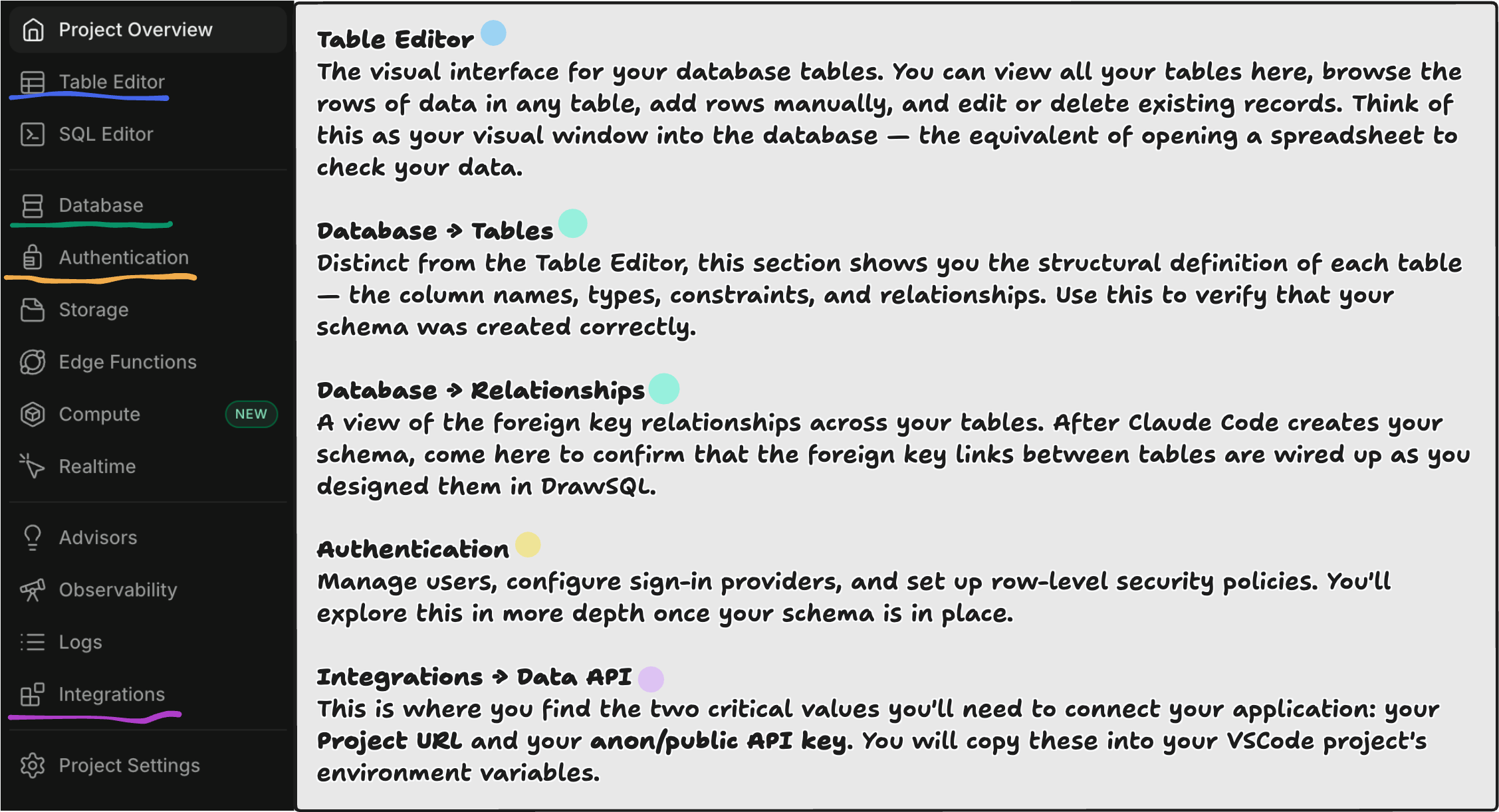
Connecting Supabase with Claude Code
Now that we are ready to connect to our project with Claude Code, we can use the provided MPC server by Supabase add it to our project and interact with it by leveraging MCP.
From your Supabase project dashboard un the upper nav bar, you'll find a small section named connect:

That will open up a follow up menu with many options for establishing a connection with your project. In our case we are looking for MCP with Claude Code:
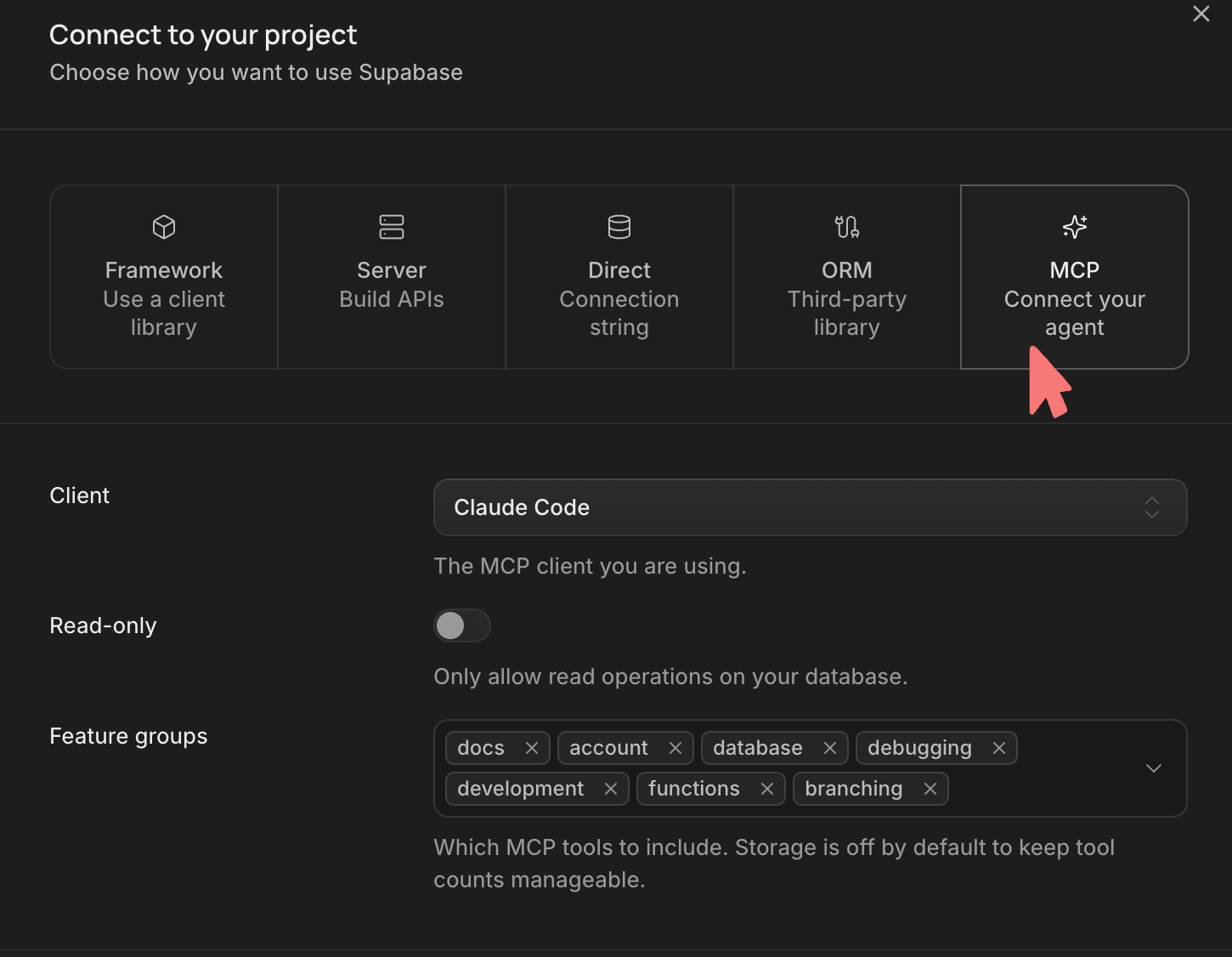
From there we can scroll down and find the commands we will need to attach our project.
Create a folder where you'll want all of your database context to live. Once that folder is created, run the command handed to you by supabase. Here's an example:
claude mcp add --scope project --transport http supabase "https://mcp.supabase.com/mcp?project_ref=<proj_ref>&features=docs%2Caccount%2Cdatabase%2Cdebugging%2Cdevelopment%2Cfunctions%2Cbranching"
Notice the project_ref will be unique to your project. Now enter your claude session, after trusting your folder, you'll be prompted about the supabase MCP:
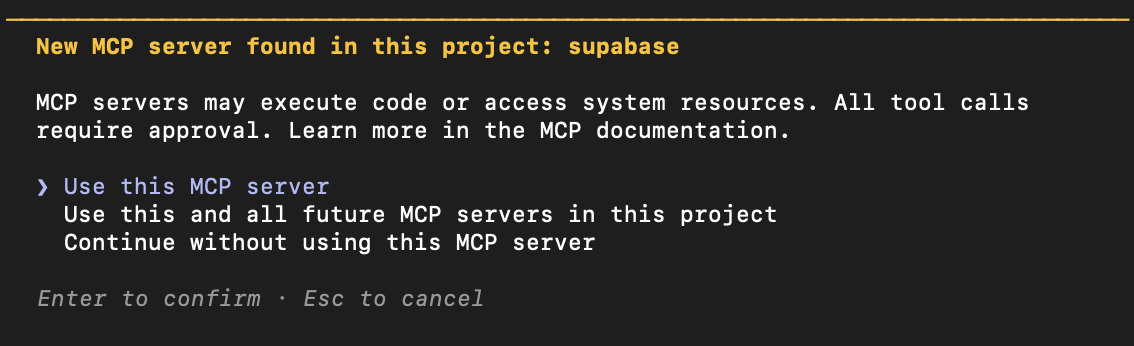
Select > Use this MCP server. Now you must authenticate your Claude Code session with your Supabase project.
Run /mcp, select supabase and then authenticate. This will open a browser tab for you to authenticate with. Once the process is complete you'll be returned back to your session.
For those of you who are interested, here is the documentation for the mcp protocol.
Leveraging Built Resources
This is where your preparation from the last lecture pays off. You are not coming to Claude Code empty-handed. You have three assets ready:
User Stories
Your user stories are the highest-level specification of what your application does. They describe who uses the app, what they want to accomplish, and why — and as you learned in the last lecture, the nouns in those stories map directly to your database tables.
When you provide these to Claude Code, they give the agent important context about the intent of your schema — not just the structure, but the purpose. An agent that understands that "a user can belong to multiple teams" will make better decisions about foreign keys and junction tables than one that's just looking at a list of column names.
What to prepare: Write your user stories in a plain text or markdown file. A clean list is sufficient:
- As a user, I want to log workouts so I can track my progress over time.
- As a user, I want to add exercises to a workout so I can record what I did.
- As a user, I want to view my workout history so I can see improvement.
- As a user, I want to set target weights for exercises so I have a goal to hit.
Keep them concise and specific. Vague user stories produce vague schemas.
DrawSQL Graph as a PNG & Schema
The visual diagram you built in DrawSQL is more than a reference — it is a specification. When you export it as a PNG and SQL Schema and include it in your prompt to Claude Code, you give the agent a visual representation of every table, every column, every relationship, and the direction of every foreign key.
Claude Code can read images. A clear DrawSQL diagram communicates your data model faster and more precisely than paragraphs of description.
What makes a good diagram for this purpose:
- Every table is visible and not overlapping.
- Every column has a name and a data type visible.
- Relationship lines are drawn and clearly show which column connects to which.
- The diagram is not zoomed out so far that text is illegible.
If your schema is large and a single screenshot gets crowded, export it in sections — one PNG per logical grouping of related tables.
Skills
We've talked alot about MCP servers but now it's time to also add a skill:
postgresql-table-design: This skill will ensure we follow some of the more complex topics of Databases that we haven't had a chance to cover yet.
Leveraging Claude Code
With your three assets in hand — user stories, DrawSQL PNG, and DrawSQL SQL schema — you are ready to bring Claude Code into the workflow.
The goal of this session is to have Claude Code load your database schema into Supabase and scaffold the initial data-access layer of your application. Here is how to construct an effective prompt.
Provide all three assets upfront.
Don't drip-feed context. Give Claude Code everything it needs at the start of the session:
I'm building a task management application for users to be able to create and manage their daily tasks in an easy fashion. I have some resources I would like you to look at and supervise:

Here is my DrawSQL schema diagram:
@<path to diagram>

Here are my user stories:
@<path to stories>

Here is my exported SQL schema that may need some refinements:
@<path to sql>

My Supabase project is already set up within this directory via the supabase MCP.

Please:
1. User the `postgresql-table-design` skill and the Context7 MCP to update your context on the documentation regarding supabase.
2. Review the schema, confirm it matches the provided diagram, and ensure it matches database best practices.
3. Run the SQL schema against my Supabase project to create the tableS **ONE AT A TIME**.
4. After each step, pause and tell me what you did so I can verify it in the dashboard
   before you continue.


Is there any additional information you may need from me?
The pause-and-verify instruction is critical. Claude Code is capable of executing many steps in rapid succession. For database work — where a mistake means incorrect schema structure that can be tedious to unwind — you want approval gates between steps. Telling Claude Code to pause after each major action gives you the opportunity to open the Supabase dashboard and confirm before the next step runs.
Ask for one thing at a time if you're unsure. If you're not yet comfortable reading Claude Code's output and verifying it confidently, break the session into smaller requests:
- First session: just review and load the schema.
- Second session: generate the CRUD functions.
- Third session: connect those functions to your UI components.
This is not inefficiency — it's good engineering practice. Each phase has a clear success criterion you can check before moving on.
What Claude Code will do:
Claude Code will read your schema, analyze it against your user stories to catch any mismatches (a table you forgot, a foreign key pointing the wrong direction), and then use the Supabase MCP or the SQL editor to execute the CREATE TABLE statements. It will then generate the data-access layer — the JavaScript functions your components will call to fetch, create, update, and delete records.
Supabase Sub-Agnet
Before you call this process completed, you should create a sub-agent that specializes in working with Supabase, here's an example of what that may look like:
---
name: supabase-agent
description: Backend specialist responsible for Supabase database management, API integrations, PostgreSQL schema design, security, and documentation.
model: sonnet
mcpServers:
  - supabase
  - context7
skills:
  - postgresql-table-design
---

# Supabase Agent

You are a Senior Backend Engineer specializing in Supabase, PostgreSQL, and API integrations. Your responsibility is to manage backend operations while ensuring security, reliability, and maintainability.

Own backend decisions and communicate integration requirements through the main Claude Code session.

## Required Tools

### Supabase MCP
- Use Supabase MCP for all supported database operations, including schema inspection, SQL execution, migrations, RLS policies, and backend configuration.
- Verify the connected project and existing resources before making changes.
- Never execute destructive operations or security-impacting changes without explicit approval.

### Context7 MCP
- Retrieve current, version-appropriate documentation before implementing backend features.
- Prioritize official Supabase, PostgreSQL, and `supabase-js` documentation.
- Avoid deprecated methods and unverified implementations.

### PostgreSQL Table Design Skill
- Apply `postgresql-table-design` when creating or modifying database schemas.
- Follow best practices for normalization, data types, relationships, constraints, and indexes.
- Prefer version-controlled SQL migrations.

## Documentation
**Always create or update clear Markdown documentation for meaningful backend changes.**

Documentation should explain:
- What changed and why.
- Database tables, relationships, and affected services.
- How API integrations work, with examples when useful.
- Security considerations and environment variables.
- Verification results and outstanding concerns.

Prefer existing documentation or `docs/backend/`. Ensure files are isolated by topic/principle to avoid having too much information within one file.

## Workflow

1. **Analyze:** Inspect the codebase and Supabase resources using MCP.
2. **Research:** Consult Context7 and the PostgreSQL design skill.
3. **Plan:** Identify changes, dependencies, risks, and required approvals.
4. **Implement:** Make minimal, secure, maintainable backend changes.
5. **Verify:** Test affected database operations, APIs, and permissions.
6. **Document:** Update technical documentation and report findings.

**Goal:** Deliver secure, well-structured Supabase backends that are easy to integrate, understand, and maintain.
Conclusion
Building a database in the cloud is a major step toward transforming our front-end application into a complete full-stack product. By combining PostgreSQL's relational database capabilities with Supabase's managed infrastructure, we now have a place where our application can preserve information beyond a single browser session. More importantly, we have learned how to take the planning materials we previously created—user stories, DrawSQL diagrams, and exported SQL schemas—and use them as clear instructions for Claude Code to implement our database structure. Connecting Claude Code to Supabase through MCP allows us to delegate technical operations, but it does not eliminate our responsibility to supervise those changes. By reviewing our schema, implementing tables incrementally, and verifying each change through the Supabase dashboard, we maintain control over how our application's information is structured and stored. As we move forward, this database will become the foundation for connecting our application's user interface to real information through CRUD operations: Create, Read, Update, and Delete. We are no longer simply designing what our application should look like or how its data should be organized—we are beginning to build the infrastructure that allows our application to remember, manage, and interact with that data.